helppppppp~ |
Re: java access doors Mathias Mamsch, IT-QBase GmbH, Consultant for Requirement Engineering and D00RS |
Re: java access doors |
Re: java access doors See: http://www.model-engineers.com/en/our-products/tudoor.html |
Re: java access doors MichaelGeorg - Wed Aug 31 05:20:28 EDT 2011 |
Re: java access doors SystemAdmin - Wed Aug 31 06:57:44 EDT 2011 http://sodius.com/mdw.php I am not a Java Developer, but it was obvious that if I were, the DOORS model is exposed very nicely through here, and I may choose to only access DOORS via Java. Try the demo! |
Re: java access doors kbmurphy - Wed Aug 31 09:10:47 EDT 2011 |
Re: java access doors llandale - Wed Aug 31 10:16:17 EDT 2011 Mathias Mamsch, IT-QBase GmbH, Consultant for Requirement Engineering and D00RS |
Re: java access doors Mathias Mamsch - Wed Aug 31 11:47:28 EDT 2011 Mathias Mamsch, IT-QBase GmbH, Consultant for Requirement Engineering and D00RS |
Re: java access doors llandale - Wed Aug 31 16:21:57 EDT 2011 Mathias Mamsch, IT-QBase GmbH, Consultant for Requirement Engineering and D00RS |
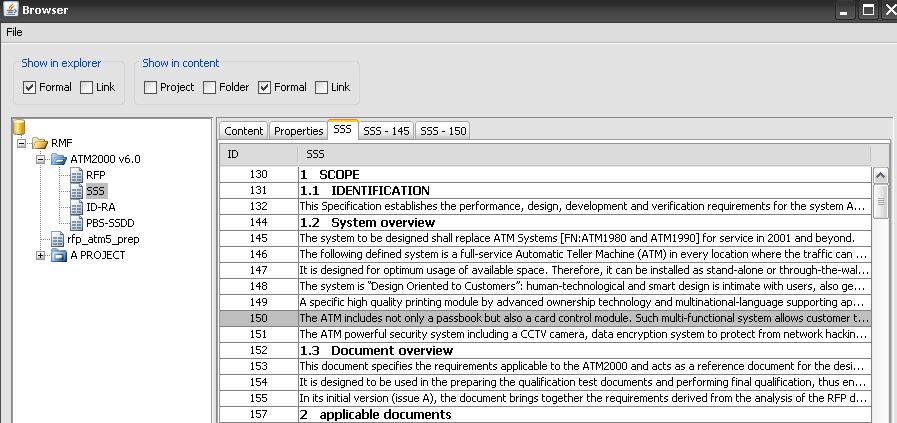
Re: java access doors Mathias Mamsch - Wed Aug 31 16:34:54 EDT 2011 Mathias Mamsch, IT-QBase GmbH, Consultant for Requirement Engineering and D00RS I am using the "jacob" component to interface java/jython to DOORS with COM. You have to write a "wrapper" library, to define a set of Java API to access DOORS, and then implement each API function as a DXL script to send to DOORS. url http://danadler.com/jacob/ For example: get the top level items in DB dxl script: bool db_get_items() { Buffer b = create() Item i for i in folder "/" do { string u = uniqueID i string t = type i b += u b += ";" b += t b += "\n" } oleSetResult tempStringOf(b) delete b return true } jython/java wrapper: from com.jacob.com import * from com.jacob.activeX import * class DOORSDB: # FOLDER = "Folder" PROJECT = "Project" LINK = "Link" FORMAL = "Formal" # def __init__(self,app): self.app = app # def send(self,oper): try: s = '#include <e:/tests/lib/doorslib.dxl>\n' s = s + oper self.app.app.invoke("RunStr", s) res = self.app.app.getPropertyAsString("Result") return res except Exception,err: print "** execution error: " + str(err) return "" # def buildItemList(self,list): items = [] if list == "" or list == None: return items for i in list.split("\n"): if i == "": continue v = i.split(";") u = v[0] t = v[1] if t == DOORSDB.FOLDER: items.append(DOORSFolder(self.app,u)) elif t == DOORSDB.PROJECT: items.append(DOORSProject(self.app,u)) elif t == DOORSDB.LINK: items.append(DOORSLinkModule(self.app,u)) elif t == DOORSDB.FORMAL: items.append(DOORSFormalModule(self.app,u)) else: continue return items # def getItems(self): s = 'db_get_items()\n' res = self.send(s) return self.buildItemList(res) ## I have used this mecanism to write a mockup of a DOORS interface in java/swing (attached file) You need to have java and dxl skills for that, but when the java API is writen you can reuse it ... luc Attachments attachment_14678694_JavaDoors.JPG |
Re: java access doors SystemAdmin - Fri Sep 02 03:39:45 EDT 2011 Mathias Mamsch, IT-QBase GmbH, Consultant for Requirement Engineering and D00RS |
Re: java access doors Mathias Mamsch - Mon Sep 05 08:55:03 EDT 2011 Mathias Mamsch, IT-QBase GmbH, Consultant for Requirement Engineering and D00RS Python is interresting because it's a complete OO language with all useful features for developper. I's interpreted, so you can adopt a development style very efficient similar to DXL, and Jython (the java implementation of Python) because you can reuse any Java code into your script without having to write wrappers. luc |
Re: java access doors SystemAdmin - Wed Sep 07 03:38:07 EDT 2011 Regards, Mathias Mathias Mamsch, IT-QBase GmbH, Consultant for Requirement Engineering and D00RS |
Re: java access doors Mathias Mamsch - Wed Sep 07 04:15:18 EDT 2011 Mathias Mamsch, IT-QBase GmbH, Consultant for Requirement Engineering and D00RS
Hi Mathias/Luke,
ActiveXComponent runningDOORS = new ActiveXComponent("DOORS.Application");
runningDoors.invoke("RunStr","print(\"Is it Working\")");
ActiveXComponent.connectTOActiveInstance("DOORS.Application");
Process doorsProc Runtime.getRuntime().exec(doors.exe -d port@server);
|
Re: java access doors SystemAdmin - Wed Feb 15 11:27:50 EST 2012
Hi Mathias/Luke,
ActiveXComponent runningDOORS = new ActiveXComponent("DOORS.Application");
runningDoors.invoke("RunStr","print(\"Is it Working\")");
ActiveXComponent.connectTOActiveInstance("DOORS.Application");
Process doorsProc Runtime.getRuntime().exec(doors.exe -d port@server);
The following seems a bit more stable than my first attempt, doesn't always detect when DOORS is open, but does most of the time, not sure why the standard answer to I cn't connect DOORS to Java isn't use JACOB?
import com.jacob.activeX.ActiveXComponent;
        import com.jacob.com.*;

                String dxlFile = "" + appDir + "\\dxl\\transferTraceInfoToDOORS.dxl";
        try{
            //Try and get the active instance of doors first
            ComThread.InitMTA();
            //ActiveXComponent runningDoors = new ActiveXComponent("DOORS.Application");

            ActiveXComponent runningDoors = ActiveXComponent.connectToActiveInstance("DOORS.Application");
            if( runningDoors ==null) {
                    JOptionPane.showMessageDialog(null,"This application needs an active running instance of DOORS to work, please fire DOORS up and try again");
                    System.exit(0);
            }
            else {
                runningDoors.invoke("RunStr", "print(\"Testing\");oleSetResult(\"Finished\")");
                //runningDoors.invoke("RunFile", dxlFile);
                System.out.println(runningDoors.getPropertyAsString("Result"));
            }
        }
        catch (Exception e) {
            e.printStackTrace();
        }
        finally {
            ComThread.Release();
        }
|
Re: java access doors Mathias Mamsch - Mon Sep 05 08:55:03 EDT 2011 Mathias Mamsch, IT-QBase GmbH, Consultant for Requirement Engineering and D00RS I need to create GUI for end user. I am very much new to DXL scripts but I know Python. Can you please tell me how I can link DXL scripts to Python scripts. Thanks :) |
Re: java access doors Pankaj@Moog - Fri Jul 20 01:01:20 EDT 2012 Mathias Mamsch, IT-QBase GmbH, Consultant for Requirement Engineering and D00RS |
Re: java access doors SystemAdmin - Thu Feb 16 04:47:33 EST 2012 The following seems a bit more stable than my first attempt, doesn't always detect when DOORS is open, but does most of the time, not sure why the standard answer to I cn't connect DOORS to Java isn't use JACOB?
import com.jacob.activeX.ActiveXComponent;
        import com.jacob.com.*;

                String dxlFile = "" + appDir + "\\dxl\\transferTraceInfoToDOORS.dxl";
        try{
            //Try and get the active instance of doors first
            ComThread.InitMTA();
            //ActiveXComponent runningDoors = new ActiveXComponent("DOORS.Application");

            ActiveXComponent runningDoors = ActiveXComponent.connectToActiveInstance("DOORS.Application");
            if( runningDoors ==null) {
                    JOptionPane.showMessageDialog(null,"This application needs an active running instance of DOORS to work, please fire DOORS up and try again");
                    System.exit(0);
            }
            else {
                runningDoors.invoke("RunStr", "print(\"Testing\");oleSetResult(\"Finished\")");
                //runningDoors.invoke("RunFile", dxlFile);
                System.out.println(runningDoors.getPropertyAsString("Result"));
            }
        }
        catch (Exception e) {
            e.printStackTrace();
        }
        finally {
            ComThread.Release();
        }
Hi!
I want to script doors from Eclipse/Java, and I tried out your sample code. It worked fine, but if I wanted to run again I got this message: "This application needs an active running instance of DOORS to work, please fire DOORS up and try again"); Is there any sample code or official documentation? I would be really appreciate,
thanks,
|
Re: java access doors zsombor90 - Tue Nov 12 09:24:26 EST 2013 Hi!
I want to script doors from Eclipse/Java, and I tried out your sample code. It worked fine, but if I wanted to run again I got this message: "This application needs an active running instance of DOORS to work, please fire DOORS up and try again"); Is there any sample code or official documentation? I would be really appreciate,
thanks,
Through a little trial and error I found that the most reliable configuration was: - 1) to not setup the COM thread i.e.Don't use the .InitMTA() method 2) Set the ActiveXComponent to null when initializing it 3) Simply use runningDoors = ActiveXComponent.connectActiveInstance("DOORS.Application") to check for a running instance using local variables, then check for null to indicate there are no DOORS clients running, don't bother to clean up any references, just let things go out of scope, bit bonkers, but I found I had less issues that way Note you can only use the COM methods runStr, runFile from Jacob, you need something like: - runningDoors.invoke("RunFile", dxlFile) Where RunFile is the method name passed as a string and dxlFile is the file I want to run in DOORS Richard |
Re: java access doors Hello, I have a curiosity. It is possible to check with java if DOORS is running when DOORS is accessed via Citrix? And another point , from where I could download the safe jacob.jar, or more exactly what version, because I downloaded one, but runningDoors = ActiveXComponent.connectActiveInstance("DOORS.Application") does not work, because connect method is not recognized. I am struggling for almost one year with this issue, would be great if someone found a solution for this problem. |
Re: java access doors Marina_Raf - Fri Nov 14 15:21:38 EST 2014 Hello, I have a curiosity. It is possible to check with java if DOORS is running when DOORS is accessed via Citrix? And another point , from where I could download the safe jacob.jar, or more exactly what version, because I downloaded one, but runningDoors = ActiveXComponent.connectActiveInstance("DOORS.Application") does not work, because connect method is not recognized. I am struggling for almost one year with this issue, would be great if someone found a solution for this problem. I think what you are trying to do, is by design not possible ... Citrix is a "Remote Application" framework, i.e. you are starting the application on another computer (remote PC) and only displaying it on your computer (client PC). That means all the DOORS interfaces (COM, batch) cannot be used the same way as before. If you want to interact with a running DOORS citrix session, then this must be done from the remote machine, i.e. for example by starting a DXL script from the DOORS menu. Of course using DXL you can also start your Java application - in this case you can use the normal COM api for interacting with the DOORS client. Normally Citrix will pop up child processes of DOORS (your java application) on the client PC as well, so it should be possible to deploy your java application inside the citrix environment and have it interact with DOORS from there. The other possibility is, that you install a DOORS client outside the citrix environment and use that one for interacting with your DOORS server. Regards, Mathias |
Re: java access doors Mathias Mamsch - Sun Nov 16 16:51:04 EST 2014 I think what you are trying to do, is by design not possible ... Citrix is a "Remote Application" framework, i.e. you are starting the application on another computer (remote PC) and only displaying it on your computer (client PC). That means all the DOORS interfaces (COM, batch) cannot be used the same way as before. If you want to interact with a running DOORS citrix session, then this must be done from the remote machine, i.e. for example by starting a DXL script from the DOORS menu. Of course using DXL you can also start your Java application - in this case you can use the normal COM api for interacting with the DOORS client. Normally Citrix will pop up child processes of DOORS (your java application) on the client PC as well, so it should be possible to deploy your java application inside the citrix environment and have it interact with DOORS from there. The other possibility is, that you install a DOORS client outside the citrix environment and use that one for interacting with your DOORS server. Regards, Mathias Hello > I think what you are trying to do, is by design not possible ... Citrix is a "Remote Application" framework, i.e. you are starting the application on another computer (remote PC) and only displaying it on your computer (client PC). That means all the DOORS interfaces (COM, batch) cannot be used the same way as before. In this case you shall create the object on the server. Standard ist: Object objDoors = createObject("DOORS.Application") But you can use the same commad for a remote object Object objDoors = createObject("DOORS.Application", "theServer"); Best regards Wolfgang |
Re: java access doors Ok, if I will proceed like this: Object objDoors = createObject("DOORS.Application", "theServer");
Then Object should be the same ActiveXComponent? and the method is simply createObject()? thank you! |
Re: java access doors Marina_Raf - Mon Nov 17 08:14:51 EST 2014 Ok, if I will proceed like this: Object objDoors = createObject("DOORS.Application", "theServer");
Then Object should be the same ActiveXComponent? and the method is simply createObject()? thank you! This is also not possible as the server has a lot of sessions. Citrix is delivering an application through terminal server or remote services as it called. If doors is delivered through citrix then you need to start from doors something that will execute your application. This requires DXL, and you can do a lot of things with DXL much easier. Don't forget that citrix a lot of times delivers applications in an isolate environment for security. |
Re: java access doors Marina_Raf - Fri Nov 14 15:21:38 EST 2014 Hello, I have a curiosity. It is possible to check with java if DOORS is running when DOORS is accessed via Citrix? And another point , from where I could download the safe jacob.jar, or more exactly what version, because I downloaded one, but runningDoors = ActiveXComponent.connectActiveInstance("DOORS.Application") does not work, because connect method is not recognized. I am struggling for almost one year with this issue, would be great if someone found a solution for this problem. i have the same problem , i want get data from DOORS when DOORs is accessed via Citrix did you find a solution ?? please help me . |
Re: java access doors Mathias Mamsch - Sun Nov 16 16:51:04 EST 2014 I think what you are trying to do, is by design not possible ... Citrix is a "Remote Application" framework, i.e. you are starting the application on another computer (remote PC) and only displaying it on your computer (client PC). That means all the DOORS interfaces (COM, batch) cannot be used the same way as before. If you want to interact with a running DOORS citrix session, then this must be done from the remote machine, i.e. for example by starting a DXL script from the DOORS menu. Of course using DXL you can also start your Java application - in this case you can use the normal COM api for interacting with the DOORS client. Normally Citrix will pop up child processes of DOORS (your java application) on the client PC as well, so it should be possible to deploy your java application inside the citrix environment and have it interact with DOORS from there. The other possibility is, that you install a DOORS client outside the citrix environment and use that one for interacting with your DOORS server. Regards, Mathias is it possible to get data from doors with java if DOORS is running and accessed via Citrix? and when I open the task manager , i found the application of the doors . Would be great if you found a solution for this problem. |
Re: java access doors Sana.Mejri - Thu Jul 20 07:23:31 EDT 2017 is it possible to get data from doors with java if DOORS is running and accessed via Citrix? and when I open the task manager , i found the application of the doors . Would be great if you found a solution for this problem. Before even discussing this, you need to present a valid use case, that would require you to access DOORS inside Citrix from your local PC ... You should consider a DXL script inside citrix writing data somewhere and your java application reading it from that location. Unless you tell me a valid reason to directly access the DOORS instance inside citrix. Regards, Mathias |
Re: java access doors Mathias Mamsch - Thu Jul 20 07:42:30 EDT 2017 Before even discussing this, you need to present a valid use case, that would require you to access DOORS inside Citrix from your local PC ... You should consider a DXL script inside citrix writing data somewhere and your java application reading it from that location. Unless you tell me a valid reason to directly access the DOORS instance inside citrix. Regards, Mathias My reason to directly access the DOORS instance is generating a file text from data of a module using java application . I am in the process of developing this java application with Eclipse IDE . So is this possible or not cause DOORS is runnig via Citrix ? WHat is the solution ? Should I just record DXL file inside Citrix? Or can I use a web service ? |
Re: java access doors Sana.Mejri - Thu Jul 27 05:10:16 EDT 2017 My reason to directly access the DOORS instance is generating a file text from data of a module using java application . I am in the process of developing this java application with Eclipse IDE . So is this possible or not cause DOORS is runnig via Citrix ? WHat is the solution ? Should I just record DXL file inside Citrix? Or can I use a web service ? Your options as far as I see it beginning with the easiest: 0. Clarify with your DOORS Administrators if you can use a DOORS client outside the citrix to access their DOORS server. Most of the times citrix only exists to prevent having to install the DOORS client on hundreds of machines and there are no access restrictions to the DOORS server whatsoever. 1. If it is necessary to invoke the DXL from the java application, you should run the java application inside citrix and have that java application run a simple DOORS batch job. 2. You should also consider the other way round - execute java from the DXL application inside citriix. 3. If 1 and 2 are not possible and your jave needs to stay outside you should consider having the user invoke the DXL manually inside the Citrix, writing the data to a network share. You java application running outside the citrix environment can scan the network share, read the file and trigger automatic actions 4. if you need to trigger the DXL from the outside, you need to clarify with your DOORS Administrators to have a Windows Server with a valid DOORS client installation setup, that can access the DOORS server. Then you need to install a (e.g. web-) service there, that will receive the signal from your java application, run the corresponding DXL batch job, write the results somewhere where your java application can read it (e.g. in the web service response). maybe that helps, regards, Mathias |